Ramp runs on Notion: How they built an AI operating system for work
Ramp pulled work into Notion so their teams could find trusted answers fast, cut productivity-tool costs by roughly 70%, and help teams move 3× faster. In less than a year, they went from setting a foundation in Notion to building agents on top of it—turning their workspace into a place where work does not just live, it moves.
Consolidating work (so AI can actually help)
In mid-2024, Ramp set a straightforward internal mission: be the most productive company in the world. They knew AI would be how they got there, but only if it was integrated throughout how the company ran.
At the time, it was not. Work was spread across too many duplicate and legacy tools and too many tabs. Not only did it slow people down. It made it hard to trust what was true.
A question as simple as “What is the latest policy?” or “Who owns this?” could turn into a scavenger hunt across docs, tickets, and chat threads. And without a reliable system of record, AI could not do much more than summarize fragments.
Ramp’s fix was simple in concept, hard in execution: consolidate and connect the work in one place and make the system legible enough that both humans and AI could operate from the same source of truth.
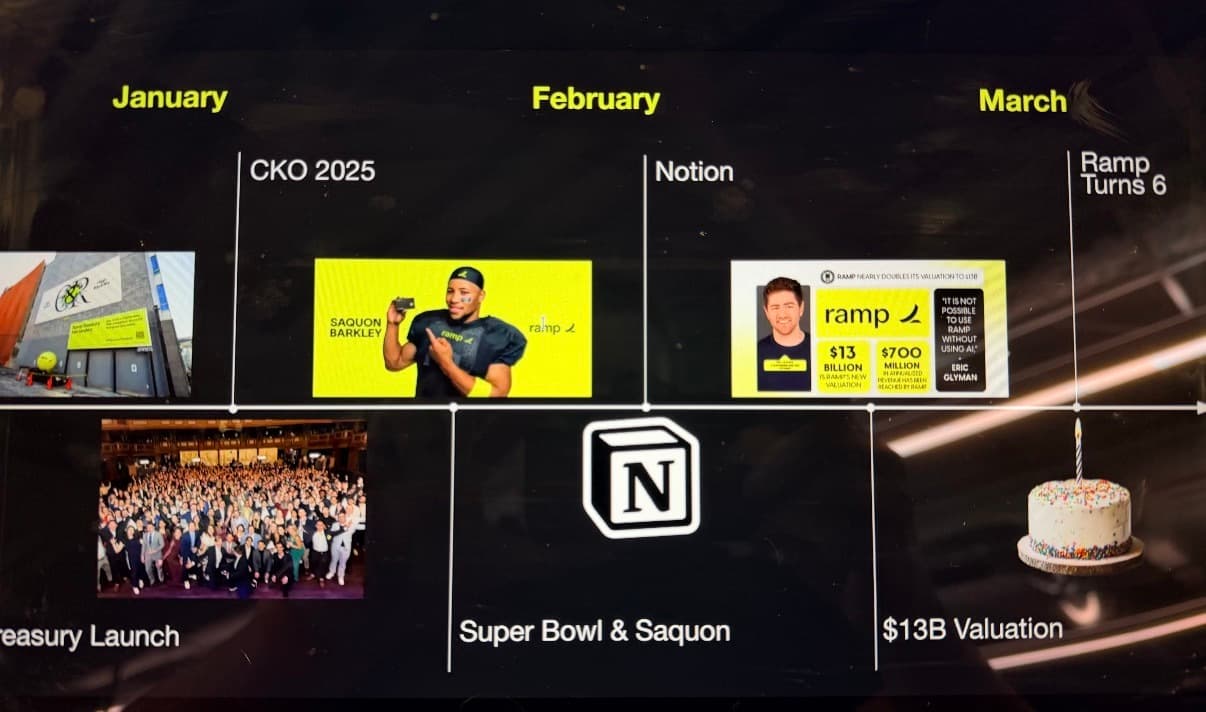
Fast forward to 2025, and you can see that foundation show up in an unlikely place: a slide from Ramp’s internal all-hands. Sitting alongside highlight-reel milestones—fundraising, a Super Bowl commercial, massive product launches—is the full rollout of a new tool the company now runs on: Notion.
With more work centralized and connected, teams spent less time hunting for context and more time making decisions. Ramp cut productivity-tool costs by roughly 70%, and teams reported moving about 3× faster. In a single year, the company’s valuation more than tripled to $32B as annualized revenue surpassed $1B—at a rate 10× faster than the median publicly traded SaaS company. Headcount, however, scaled more modestly because output per employee kept rising.
With that foundation in place, Ramp could build a stack that makes sense:
Notion as the system of record.
Notion Agents to turn answers into action.
Set a philosophy—multiply impact, do not add busywork
Even after Ramp consolidated its work in Notion, the day-to-day friction did not magically disappear. Meetings still dragged on, key context still lived in tools that were not yet connected, and the new system only worked if people built new habits of delegating tasks.
So leadership made the call: assume the AI game has changed, tear up the old timelines and org charts, and stop treating “reasonable” as fixed. The philosophy was not to replace people, but to multiply their impact.
And Ramp put someone in charge of making that real: Ben Levick, Ramp’s Head of Ops and Internal AI.
“Everybody has a responsibility right now to bring their teams up the curve of AI usage and to get them more comfortable being AI native,” said Ben.
Everybody has a responsibility right now to bring their teams up the curve of AI usage and to get them more comfortable being AI native.

Getting AI into everyone’s hands
Ramp started treating AI as teammates: always-available helpers that take tasks off people’s plates and expand what each team can deliver. They focused first on simple, high-leverage use cases: meetings, where the most important context is created and the most expensive misalignment begins.
Notion’s AI meeting notes changed how Ramp ran meetings. Conversation context stayed close to the work it impacted, decisions flowed into the right places, and follow-ups were easier to track without someone playing human stenographer or project manager.
Then Ramp widened the funnel from “capturing” to “finding and verifying.” AI search got stronger as connectors improved and scoping got sharper, pulling in what still lived in Slack, GitHub, and Ramp’s own systems into concise, accurate answers.
“Our AI doesn’t just search keywords,” says Cameron Leavenworth, Manager of Corporate IT. “It understands our workspace’s actual structure and relationships.”
The final step was giving everyone a personal Notion Agent to take on time-consuming manual tasks. Like a great assistant that has mastered Notion, it helped people draft first passes, analyze and update databases, route requests, and build workflows.
These were not AI novelties. They became reliable accelerants to everyday work.
Our AI doesn’t just search keywords. It understands our workspace’s actual structure and relationships.

Build agents. Delete repetitive workflows.
In mid-2025, Ramp started experimenting with autonomous Notion Agents, and Ben’s systems mind took off. “The goal now,” he says, “is to build your way out of your workflows. When a single agent can complete your tasks thousands of times—that’s the productivity magic.”
Today, the work does not start from scratch each week. People set up agents once, and those agents keep running across shared, durable workflows the whole company can count on.
There are more than 300 Notion Agents getting things done every day. Here are some of the most impactful:
The Product Q&A Oracle—a Slack-connected agent that answers up-to-the-moment questions about Ramp’s products.
Sales Feedback Categorizer—maps inbound sales feedback to the roadmap and closes the loop when features ship.
Referral Bonus Roy—identifies customers who should receive a referral bonus and routes the work to completion.
Enablement Eddie—helps the GTM org find the right customer-facing assets and answer nuanced questions fast.
Customer Advocacy Miner—surfaces high-satisfaction customers and compelling use cases across many sources.
AI Compass—guides Ramplings to the right AI tool for a given job.
RCARoundup—turns incident threads into structured summaries in a Notion database.
The Underwriter—a policy-grounded Q&A agent for underwriting.
AI Inspector—summarizes AI news into a daily digest.
Creative Chris—routes creative requests and nudges work forward.
Custom Agent Carrie—helps teammates build better agents based on what Ramp has learned.
Ben describes the change in simple terms: “Agents get created in three minutes between meetings,” then “hours of manual operational work disappear.”
Advice you can steal
As Ben sees it, the world needs more builders.
His north star is simple: turn everyone into a builder who makes fewer low-stakes decisions, more high-stakes judgments. “It’s important to think about productivity as a combination of speed and efficiency, but also quality and output,” he says.
On the other side of the AI adoption curve, Ramp has found that people not only move faster. They also feel better about the work.
As Ben puts it: “There are two dopamine hits along the way. One is when you crack the problem and automate work you don’t like doing. The other is when, on the other side, things go a little more quiet, you have more time in your day.”
So what can you take from Ramp’s path?
Do not wait for a perfect button. Use AI enough to learn where it breaks.
Consolidate the work so AI can navigate the same context and workflows as your team.
Start small. Nail the quality of each unit of AI work, then automate.
Keep humans focused on judgment calls.
If you give people the right tools and the right foundation, more of the company becomes builders, and the work gets better—not just faster.
It’s important to think about productivity as a combination of speed and efficiency, but also quality and output.