
Data questions at Notion used to hit the same bottleneck: our data team’s time. Someone would post in Slack, then a data scientist would triage the request, find the right source, check the definition, write the query, and explain the result. Even routine questions could take days.
We built Data Scout, our internal data agent, to shorten that loop. Now anyone at Notion can ask a question in plain language and get an answer from our governed data in Snowflake. Within two months, weekly requests to the data team fell by about 80 percent. Questions that once sat in a queue now take a couple of minutes.
That shift gave our data team back time. Instead of repeatedly pulling the same numbers or running variations of the same analysis, they can focus on deeper work that needs their judgement and expertise.
Today, about half of Notion employees use Data Scout. But the bigger change is how people work. Teams ask it to pull numbers while conducting research, building reports, and preparing for meetings. “Have you asked Data Scout?” has become a common question. People no longer need to open a ticket and wait before bringing data into a decision-making process.
I’m a data engineer who helped build Data Scout. I wrote this for business leaders who want to understand why we built it and what changed, and for my data-engineering friends who want to know how we built it. I’ll start with how teams use Data Scout today, then get into the technical choices and trade-offs behind it.
Uh-oh! It looks like your ad blocker is preventing the video from playing.
Please watch it on YouTube

How teams at Notion use Data Scout
Data Scout connects governed data in Snowflake with company knowledge in Notion and connected sources such as Slack. Snowflake enforces data permissions, while Notion controls access to the agent and its tools and supplies the business context needed to understand each question.
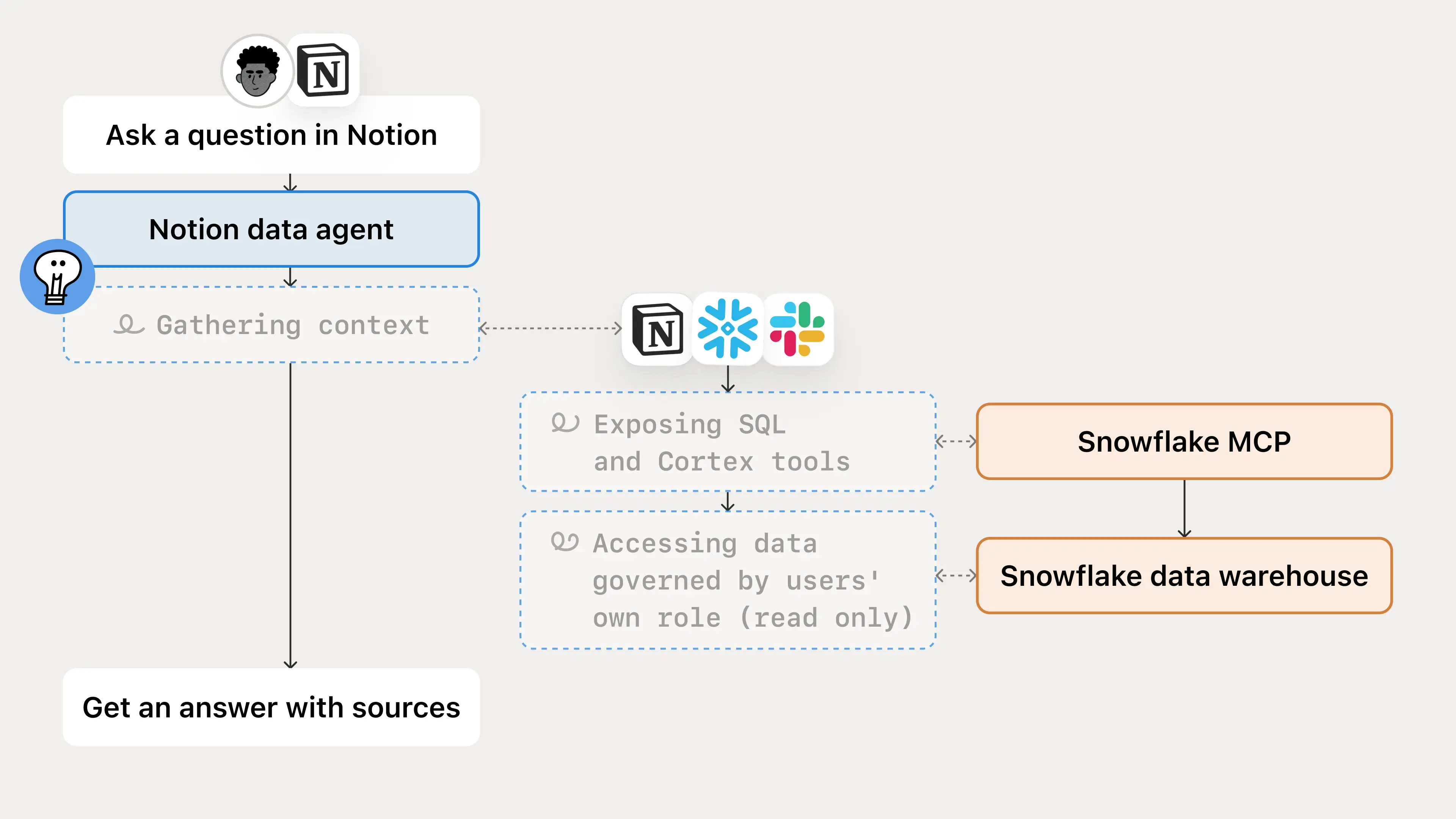
That shared foundation and permission model enables many teams to use the same agent for different decisions: Sales can ask about account adoption, Product can examine onboarding drop-off, and Customer Experience can investigate support volume.
We ran a sample of 200 real questions to Data Scout and here are some of the most common themes:
Team | Recurring work | Representative question |
|---|---|---|
Sales | Account usage, AI adoption, seats, ARR, pipeline, and ownership | How is this account using Notion and AI across its workspaces? |
Engineering | Product and AI behavior, identity lookups, and data validation | Which agents or workspaces stayed active, and where did behaviour change? |
Customer Experience | Ticket volume, first-response time, CSAT, and customer context | What’s driving this support queue’s volume and response time? |
Product | Feature adoption, onboarding, activation, and conversion | Where do people drop out of onboarding, and how does that vary by cohort? |
Marketing | Account targeting, customer adoption, campaigns, and pipeline | Which target accounts already use Notion AI, and where should we focus outreach? |
One example from our GTM team: understanding account adoption
To show how these pieces come together, let’s follow a GTM teammate as they prepare for a customer renewal.
They ask, “Is AI adoption growing in this account?” A useful answer needs the right usage metric and account scope, along with the customer’s goals and planned AI rollout. Data Scout combines Snowflake usage data with account notes and past meetings in Notion to show whether adoption matches the customer’s plan.
The first answer often leads to another question: “Which teams are driving the increase in AI adoption?” or “Is this growth coming from new users or deeper use among existing users?” Instead of opening a new data request for every follow-up, our account manager can dig into the data in the same conversation, arriving to the upcoming renewal meeting with a full picture of what changed.
From one data agent to recurring and specialized workflows
These kinds of ad hoc questions were only the start. Over time, teams built agents that connect to Data Scout through its shared MCP connection, reusing its governed data access and company context. Two follow-on patterns of work emerged:
Recurring analysis: Data Scout Reporter connects to Data Scout to turn saved report definitions into scheduled reports in Notion and Slack, so teams can track the same metrics over time without running the analysis each week.
Domain-specific expertise: Teams built specialized agents with deeper guidance for their own workflows, while still leveraging Data Scout’s governed data and context.
Data Scout is the Notion’s most-used internal agent, but these related agents have become popular in their own right. The former is what you turn to with an ad hoc question; the latter brings that foundation into repeatable, team-specific workflows. Yet as more teams and agents reused the same foundation, keeping their answers reliable became the harder problem.
Why working SQL isn’t enough
We found that a query could run cleanly and still answer the wrong question. The hard part was keeping the business meaning intact as a question became a query and the query became an answer. Take the adoption question. Even when the SQL works, the answer can go wrong in four ways:
The meaning can be wrong. Counting workspace memberships instead of people can inflate adoption when someone belongs to several workspaces.
The routing can be wrong. The agent may find a plausible table or connection without finding the maintained definition and required filters.
The measurement can be wrong. A change in how we track usage, or a correction to historical data, can make adoption look like it went up or down when customers didn’t actually change what they were doing.
The interpretation can be wrong. A correct number can still be misread. Adoption that looks flat may be right on plan if the customer is rolling AI out one team at a time, and that context lives in account notes and past meetings in Notion, not in Snowflake.
The lesson we learned was clear: Curated context is as important as the connection itself. Access to data doesn’t tell the agent which definition to trust, which source to use, or what a result means for the business. That knowledge needs an owner and a way to stay current.
How we build and govern data agents
We build around governed agent and data access, shared data context, and clear instructions. Together, these define the agent’s permissions, the knowledge it uses, and the process it follows.
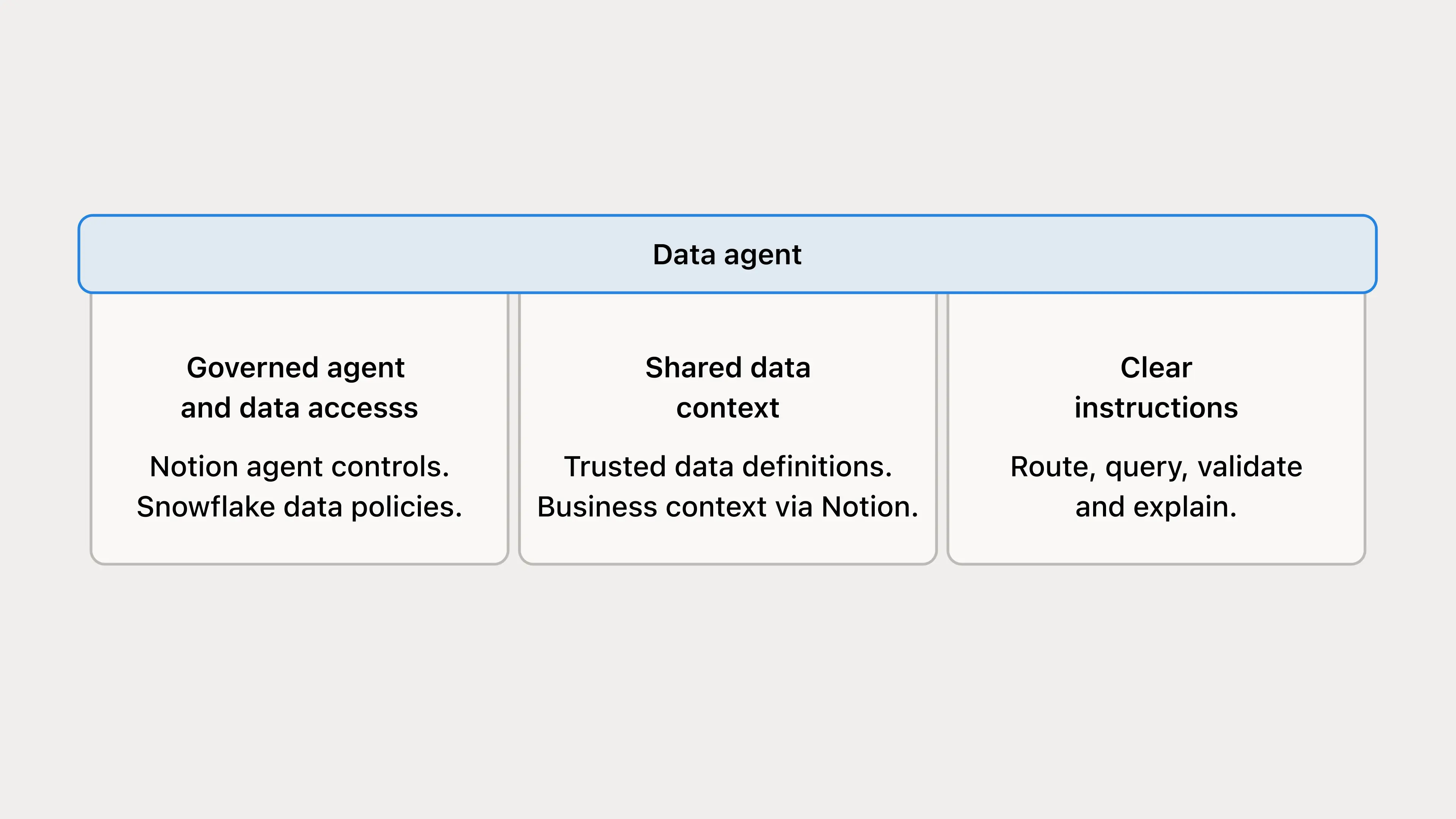
The pillars alone do not make answers reliable. We validate the results, inspect how the agent reached them, and update the guidance as the data and business change.
Governing the agent and its data access
Notion and Snowflake govern different parts of the workflow. Notion manages workspace access and available tools, while Snowflake enforces data permissions for the identity executing the query.
Users can connect to Snowflake MCP via Custom Agents or their Notion Agent. Regardless of the entry point, each user is required to sign in to Snowflake using their own credentials. That way, queries run under that person’s authenticated Snowflake identity, and answers reflect their individual data access.
Snowflake data controls enforce roles and grants, with masking and row-level policies where configured, limiting privileges to the data and actions the workflow needs.
The account manager’s query must respect the connection’s data permissions, and its results must be appropriate for the report or channel where they’re shared. An agent may surface data that was hard to find, but it does not bypass access controls.
Connecting data and business context
Shared data context helps agents use the same definitions and source guidance. Notion is our hub for business context, with plans, decisions, and customer knowledge the agent can use to better understand what the question means.
We keep the responsibilities distinct even when the references live together:
Data context governs the calculation: metrics, sources, grain, relationships, required filters, and freshness.
Business context explains goals, company terminology, customer history, and events that may help interpret the result.
Routing guidance selects the right approved sources, connections, and tools, then finds the relevant context. It can span multiple Snowflake connections or different platforms, not just tables within one warehouse.
We use a Notion database as a shared index for definitions, schemas, Skills, and known data changes. Each row is also a page. Its properties help the agent find relevant guidance, while its body contains the definitions, procedures, caveats, or references the agent needs to use.
The agent reads the selected page bodies and follows relevant references, rather than loading the whole database. Metadata helps it find the right context, but doesn’t replace that context. If a definition lives elsewhere, the entry points to its maintained source rather than copying it.
We chose Notion because it keeps the context beside the plans, decisions, and customer knowledge our teams already maintain there. The agent can read a metric definition and the account notes that explain it in the same workspace. Owners can edit and share familiar pages using Notion’s existing permissions, and agents can find entries through their properties, then read the page bodies. We tried putting all the guidance in database properties for faster retrieval, but it overloaded the metadata and was harder to maintain.
The trade-off is that a searchable page library does not enforce metric definitions or replace a semantic layer. It still needs clear owners, current source references, and a review process, which is why we maintain the review and triage loop described below.
Even so, Notion was the right home for us. The people who know what a number means are already writing about it in Notion, so the context lives next to the work that keeps it current. It isn’t a requirement, though. Customers can keep data expertise in existing tooling, including Snowflake Semantic Views and Cortex Analyst, and connect it to business context in Notion.
The routing guide narrows the search before a query is written, while keeping data definitions separate from business interpretation. This is an example pattern; the connected systems depend on your setup.
Organizing context by domain and question type
Our discovery instructions start with one or two relevant domains and related Skills before choosing tables. An exact high-priority Skill or FAQ can be enough for a point lookup; the agent expands its search only when guidance is missing.
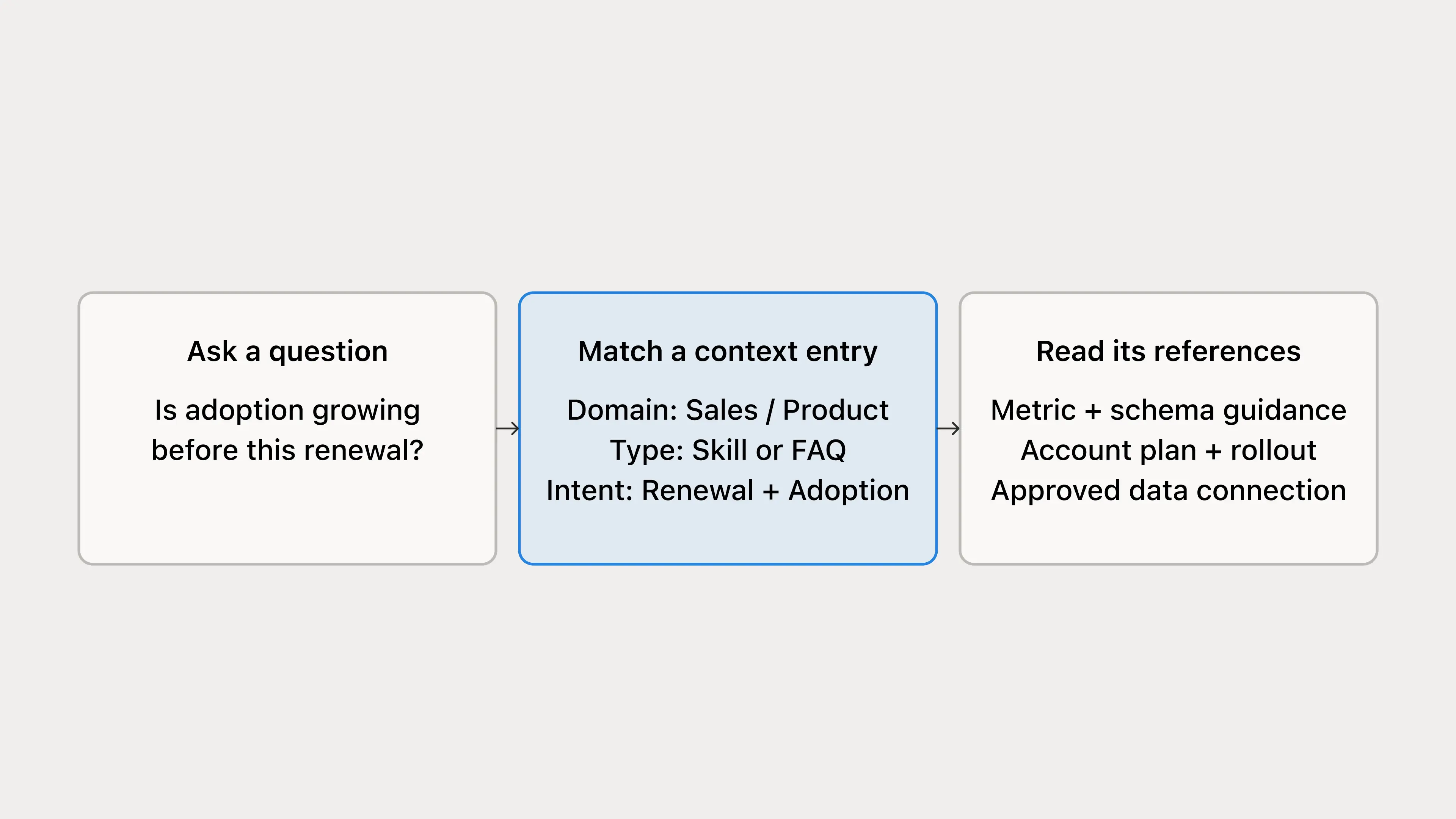
The index helps it find the right page and understand what that page is for. These fields come from the discovery guidance; the example values are illustrative.
Field | Purpose | Example |
|---|---|---|
Title | Name the entry clearly | Account adoption before renewal |
Domain | Narrow the business area | Sales, Product |
Type | Indicate how to use the page | Skill, Metric Definition, Table Schema, FAQ |
Description / Keywords | Match intent and familiar terms | Renewal, adoption, account review |
Priority | Order relevant guidance | Team-defined retrieval priority |
Each row opens a page with consistent headings. A short Skill entry might look like this:
The type matters: a Skill supplies the procedure, a Metric Definition supplies the calculation, and a Table Schema supplies grain, filters, joins, and caveats. The entry points to the maintained definition rather than creating another version.
Review status, freshness, and ownership still matter. Priority controls retrieval order, not approval or access.
Clear instructions for repeatable analysis
Good context still needs a consistent way to use it. Clear instructions help the agent choose the right sources, check its work, and stop when it can’t support an answer.
Once the question and source are clear, a successful execution still needs a check before it becomes an answer.
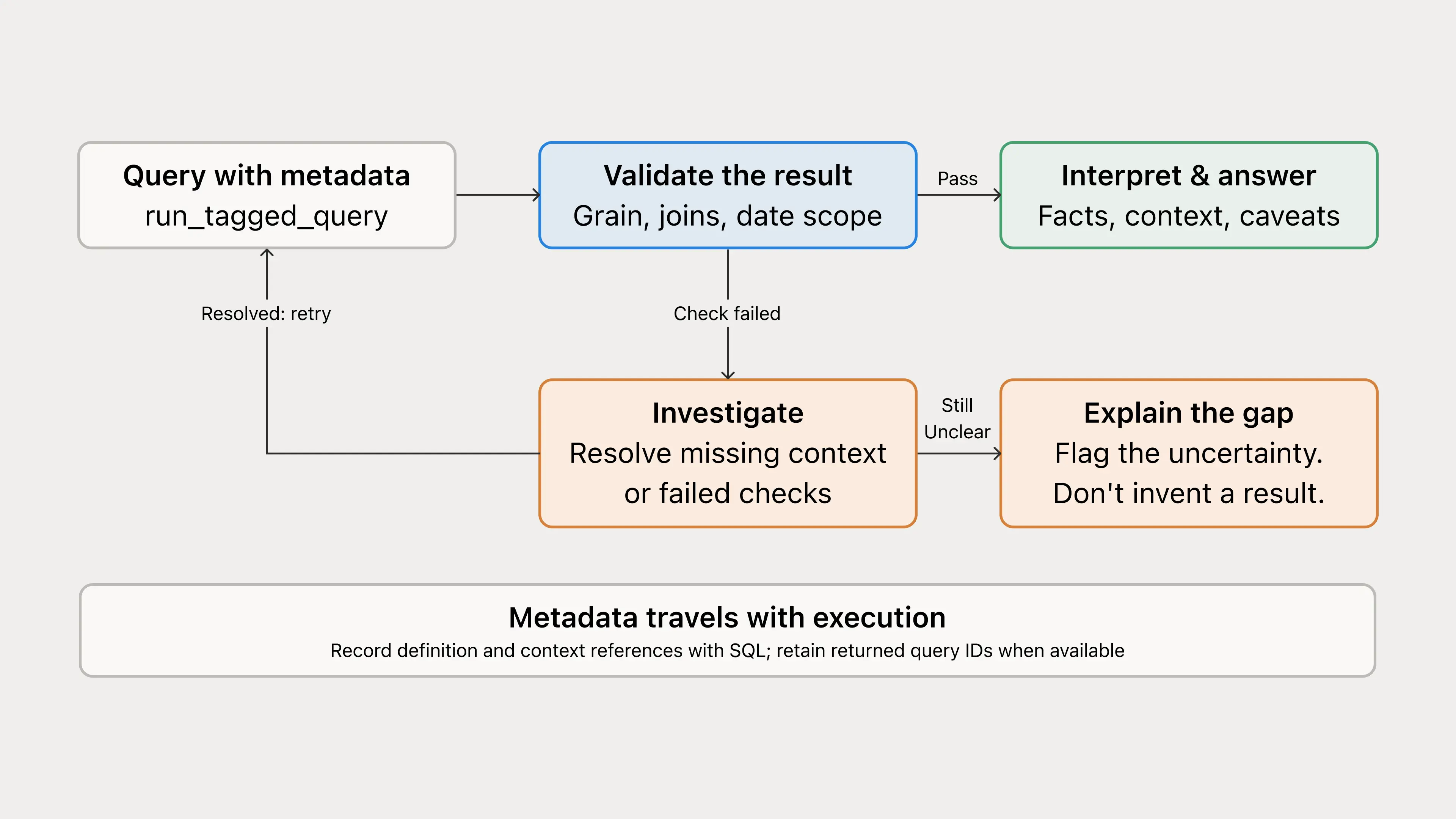
The discovery guide includes concrete failure handling. If a required column isn’t documented, inspect the relevant schema; if Snowflake reports an invalid identifier, verify the schema rather than trying another plausible name.
When the loaded guidance already documents the required fields, the agent can use it without retrieving a wide schema again. These are specific choices about where to spend a query or retrieval call.
Resolve the metric, account or population, period, and comparison before calculating.
Route to the approved connection and source, then use the relevant domain guidance or skill.
Check query logic and returned data, including join cardinality, filters, denominators, and incomplete periods.
Flag missing definitions, denied access, and failed checks instead of inventing a workaround.
Separate uncertainty about a number from uncertainty about its explanation.
Lead with the finding and supporting evidence. Keep intermediate queries out of the main answer unless they help the reader check it.
Let’s go back to the account adoption example. Before Data Scout interprets the trend through the account plan, it checks that the measurement itself holds up:
Entity check: the account-to-workspace mapping covers the intended customer without duplicating people or activity.
Metric check: numerator, denominator, exclusions, and periods follow the maintained definition.
Data check: the period is complete enough to compare, and known tracking changes or backfills are accounted for.
Snapshot check: if a source has one row per entity per day, a current-state lookup uses one as-of date. A multi-day range can count the same entity repeatedly, so we reserve it for an explicit trend.
Interpretation check: the response distinguishes the measured change from a possible explanation in rollout notes or customer conversations.
The account manager can ask follow-ups and inspect the sources. The account team still owns the decision.
Keeping data and business context current
Both the data and the business keep changing, so the guidance around them has to keep up. Data context shifts as models, definitions, and source systems change, and business context shifts with plans, decisions, and customer activity. At Notion, we maintain this guidance with scoped Custom Agents, not database automations. Each night, a review agent looks at Data Scout conversations and queries, Slack, Notion, and GitHub for missing, stale, or conflicting context and records what it finds. A triage agent then removes duplicates, applies small, well-supported fixes, and sends anything ambiguous or higher-risk to a person for further review.
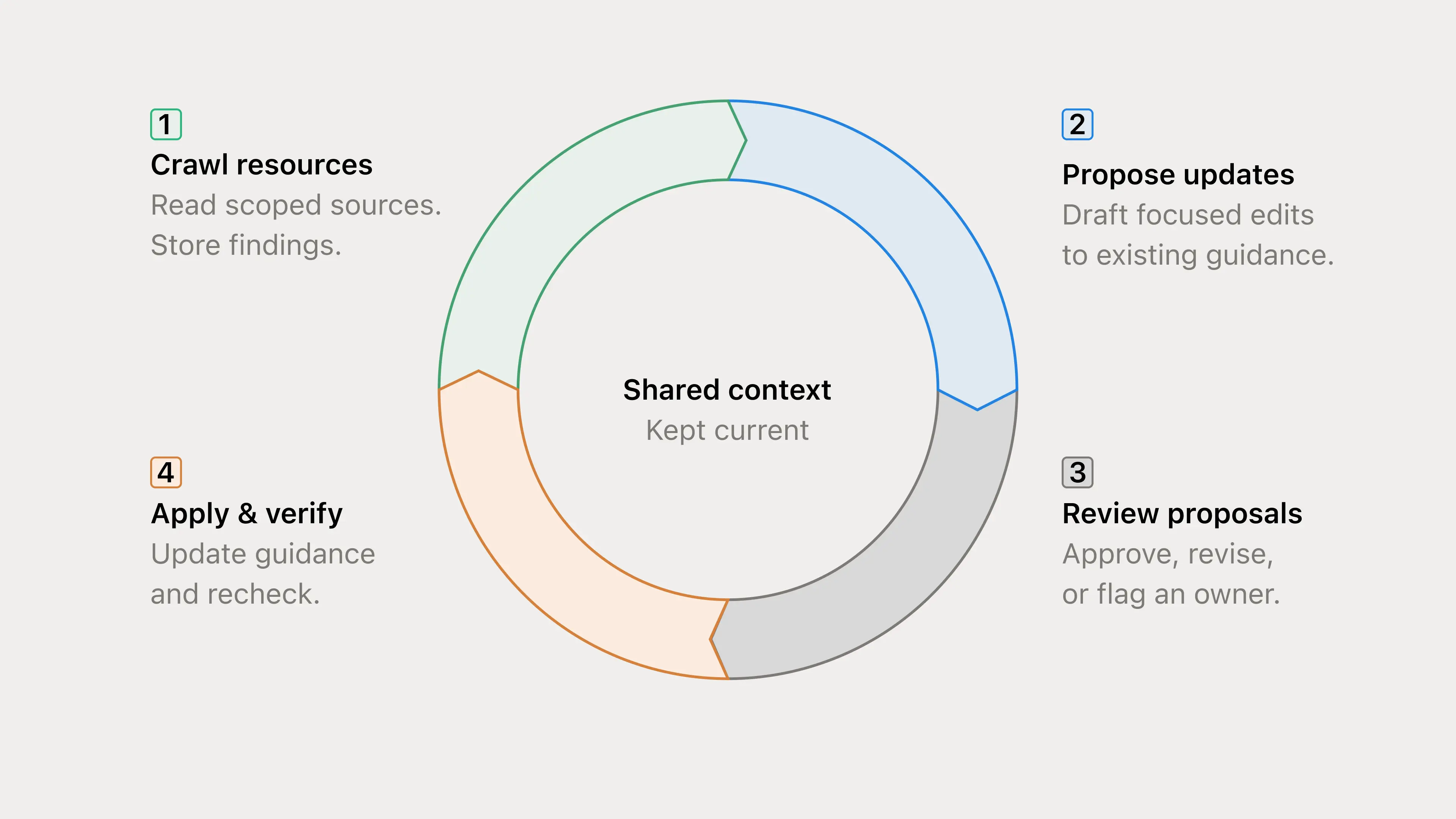
This review process separates evidence of a change from permission to apply it.
Evidence isn’t approval. A Slack correction is a reason to investigate, not permission to rewrite a metric.
Merged isn’t deployed. A PR doesn’t prove the change is live or historical data has been backfilled.
Review before reuse. Apply only authorized changes, preserve newer human edits, and verify updates. Unclear or consequential changes go to the owner.
For the adoption example, a renamed event or resolved incident may require an update to source guidance. The answering agent should use that reviewed update, not silently rewrite its own definition while answering. The companion guide covers the review and triage workflow in more detail.
Seeing what the agent actually did
Our query execution wrapper, run_tagged_query, combines metadata and execution in one call. It appends structured metadata as a JSON comment in the SQL, then calls the upstream Snowflake query tool internally.
The metadata can include the canonical metric, definition reference, context pages, filters, time window, and question ID. A SQL comment is not Snowflake’s native QUERY_TAG session parameter. Where the execution layer controls a stable Snowflake session, it can also set the same metadata as QUERY_TAG, making attribution directly filterable in ACCOUNT_USAGE.QUERY_HISTORY. Don’t assume separate tool calls share a session; pooled sessions must also replace or clear the tag reliably to avoid misattribution.
These traces help us investigate the analysis and decide where improvements belong.
Are equivalent questions using the intended definitions and scope?
Do failures point to missing context, the wrong source, or an execution problem?
Where are queries or context lookups being repeated unnecessarily?
Which recurring questions need a reusable analysis pattern or report?
If the adoption question produces different answers, the trace can help reveal a different account mapping, population filter, or time window. We can then investigate whether the fix belongs in the data definition, the routing, or the validation instructions.
We’re still improving checks against answers validated by data owners. That means testing changes to context and instructions against the same representative questions, using fixed periods or snapshots where needed. Query success and rising usage are useful signals, but neither proves accuracy.
These traces are useful, but they have limits. Consistency doesn’t mean identical SQL. Equivalent queries can look different, and different permissions can legitimately produce different results, so we compare the definition, scope, and period instead. Read-only queries still consume resources, so we keep tools focused and investigations bounded. More retrieval or retries don’t automatically improve an answer. The wrapper is also lenient by default so incomplete attribution doesn’t block a valid query. Stricter metadata checks can be turned on, but neither mode proves an answer is correct or changes data permissions.
Building your own data agent
Start with a small set of recurring questions, backed by approved data and maintained guidance. Use those questions to decide what the agent needs, rather than trying to document the entire company first.
Choose permitted data and definitions your data owners trust.
Connect the relevant business knowledge and make the analysis process clear.
Inspect the work and keep a way to review corrections as the system evolves.
If you’d like to learn more about how we've set this up at Notion, our help center guide walks through the connection choices, example instructions, routing guidance, maintenance workflows, and query-logging examples we use.
If you’re interested in building a data agent for your team, we’re running an early access program to help our customers set up Snowflake-powered Notion agents. Get in touch!